Learn the concept
This is the step-by-step. For what it is and how it fits the bigger picture, read Expense Claims in the reference.
This is the step-by-step. For what it is and how it fits the bigger picture, read Expense Claims in the reference.
What this does
Use Reimbursement to record expenses an employee paid out of pocket, approve them, and post them to your expense accounts.
Before you start
The employee record exists, and you know which expense accounts to charge.
Open Reimbursement
Go to Menu > Finance > Reimbursement.
Steps
- Click Create. Pick the Employee (the claimant) and set the Date.
- Add a Description, and link a Project if relevant.
- In Order Line Item, add a line per expense: the expense account, a description, the amount and any tax.
- Click Create, then Approve it (this moves it from Verify to Approved).
- Use Post to Ledger to post the approved expenses. If it should become a purchase, use Formalise Purchase.
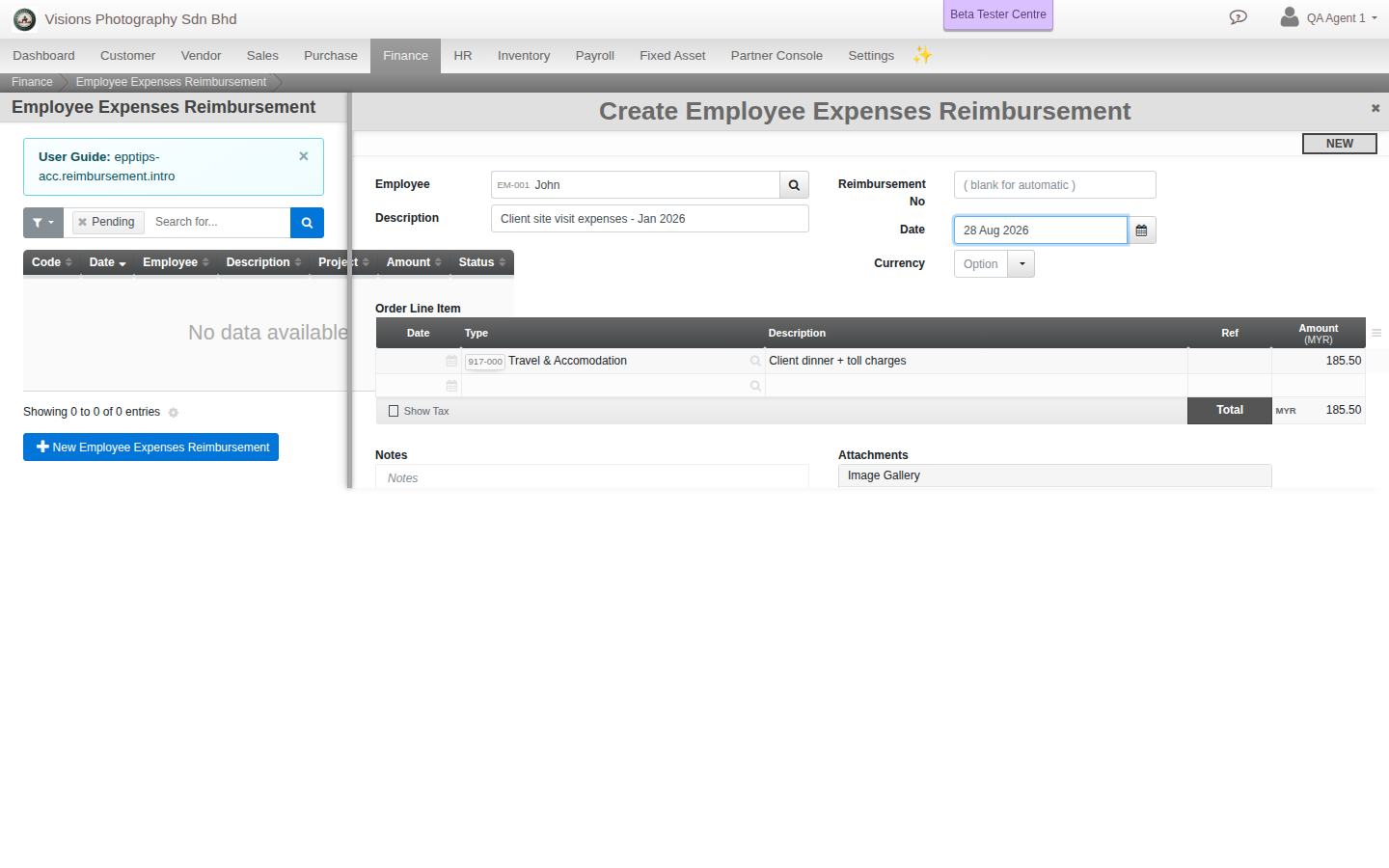
Field guide
- Employee. The claimant.
- Project. An optional link.
- Line items. The expense account, description, amount and tax per line.
Good to know. A reimbursement is an expense claim with its own steps (Verify, Approved, Posted). It is paid later by payment or salary, and is separate from the Payroll module.