Learn the concept
This is the step-by-step. For what it is and how it fits the bigger picture, read e-Invoice (MyInvois) in the reference.
This is the step-by-step. For what it is and how it fits the bigger picture, read e-Invoice (MyInvois) in the reference.
What this does
This screen sends your invoices to LHDN MyInvois and tracks what happened to each one. You also consolidate eligible documents here.
Before you start
e-Invoice is set up. See Set up e-Invoice (MyInvois).
Open E-Invoice Documents
Go to Menu > Finance > Accounting Processes > E-Invoice Documents.
What you see
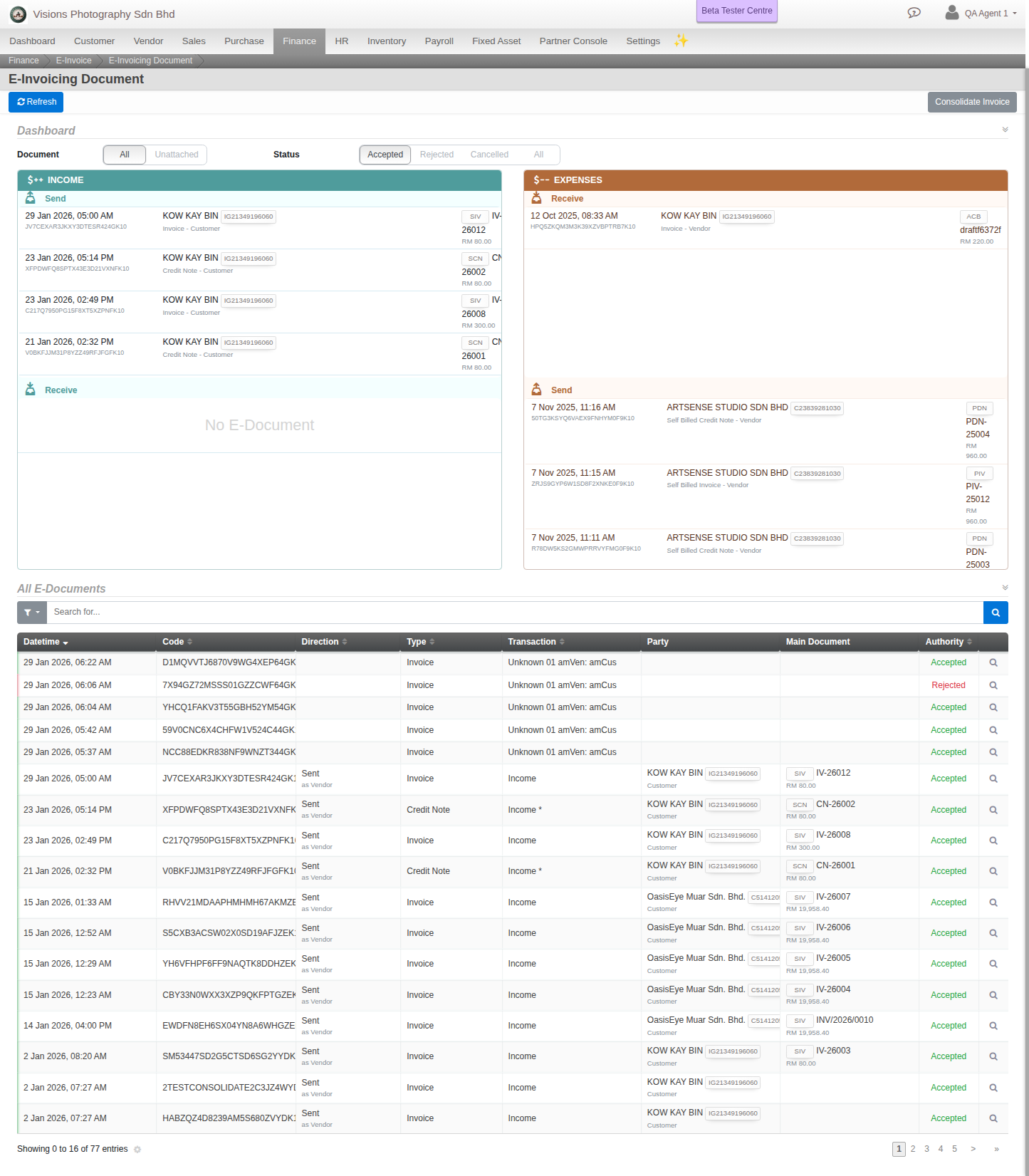
A dashboard split into Income and Expenses, each by Send and Receive, and a table of All E-Documents with each document Datetime, Code, Direction, Type, Party and Authority status.
Steps
- Open E-Invoice Documents.
- Filter by Document and Status to find what you need.
- Use Refresh to sync the latest status from LHDN. Each document shows Accepted, Rejected or Cancelled.
- To bundle eligible invoices, use Consolidate Invoice, then Generate Consolidated Invoice.
Good to know. Status flows from Pending to Submitted to Validated, then Accepted, Rejected or Cancelled.