Learn the concept
This is the step-by-step. For what it is and how it fits the bigger picture, read Journal Entry in the reference.
This is the step-by-step. For what it is and how it fits the bigger picture, read Journal Entry in the reference.
What this does
A journal entry is a manual double-entry posting. Use it for adjustments no other screen makes for you. You enter the debits and credits yourself.
Before you start
Know which accounts to debit and credit, and the amounts.
Open Journal Entry
Go to Menu > Finance > Journal Entry.
Steps
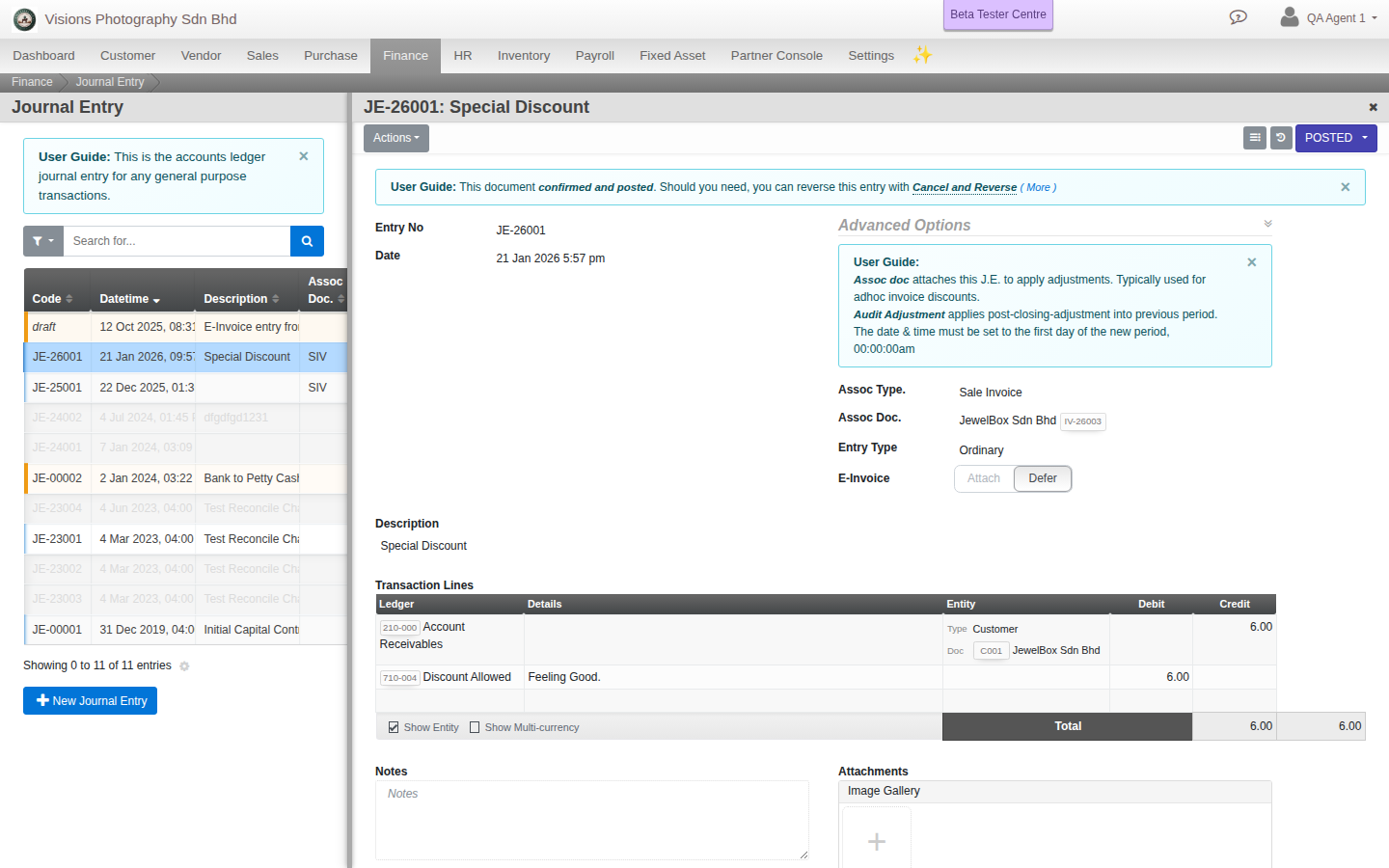
- Click Create. Set the Date and a Description of what the entry is for.
- In Transaction Lines, add a line per account: pick the Ledger, then enter a Debit or a Credit amount and an optional line description.
- Keep adding lines until total Debits equal total Credits.
- Optionally link the entry to a Project or document with Assoc Type and Assoc Doc.
- Click Create, then Approve when ready.
The rule
Total debits must equal total credits. Cloudby will not let you confirm an unbalanced entry.
Field guide
- Entry No, Date, Description.
- Assoc Type / Assoc Doc. An optional link to a project or document.
- Transaction Lines. Ledger, Debit, Credit per line.
Good to know. Most postings happen automatically from other documents. Reach for a journal entry only for manual adjustments.