Learn the concept
This is the step-by-step. For what it is and how it fits the bigger picture, read Cash & Financial Accounts in the reference.
This is the step-by-step. For what it is and how it fits the bigger picture, read Cash & Financial Accounts in the reference.
What this does
Use Fund Transfer to move money between your own cash and bank accounts, for example from a current account to a savings account.
Before you start
Both accounts exist in Cash and Bank Accounts.
Open Fund Transfer
Go to Menu > Finance > Fund Transfer.
Steps
- Click Create. Set the Datetime and a Description.
- Under Funding Source, set the Fund Type and Fund Item (the account money leaves), the Currency and the Amount, plus any Outbound Fees.
- Under Funding Destination, set the account money lands in, its Currency and Amount, plus any Inbound Fees.
- Add Transfer details, set the Transfer status (Pending or Completed) and the clear date.
- Click Create, then Approve when ready.
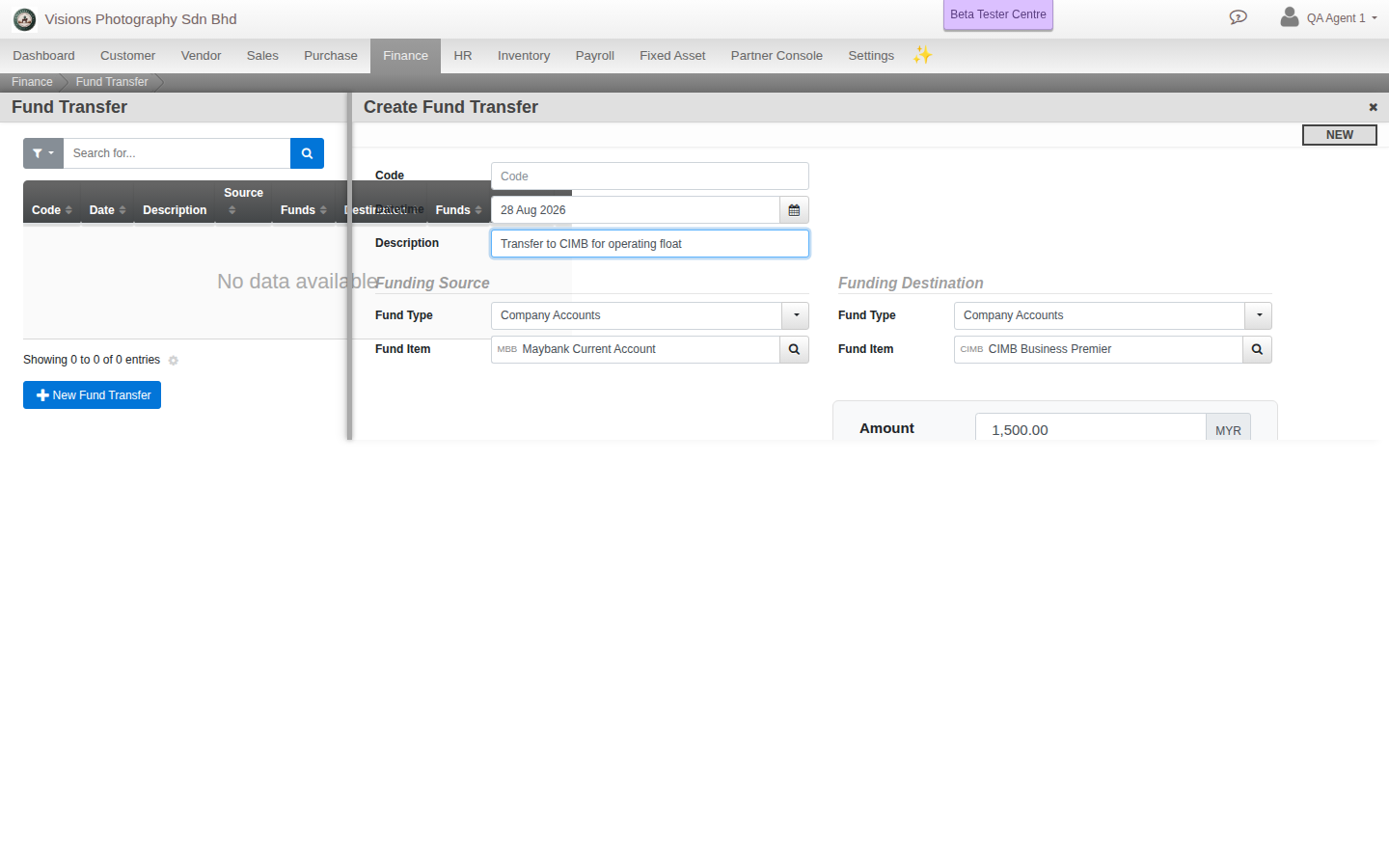
Field guide
- Funding Source. The account money leaves, its amount and any outbound fees.
- Funding Destination. The account money lands in, its amount and any inbound fees.
- Transfer status. Pending or Completed.
Good to know. When the source and destination currencies differ, enter both amounts and Cloudby records the exchange.