This is the step-by-step. For what it is and how it fits the bigger picture, read Document Overrider in the reference.
Setup task
What this does
Document Overrider is an admin tool to correct properties on documents that are already posted, such as a wrong date, serial, location or project, without unwinding the whole document.
Open Document Overrider
Go to Menu > Settings > Administrative > Document Overrider.
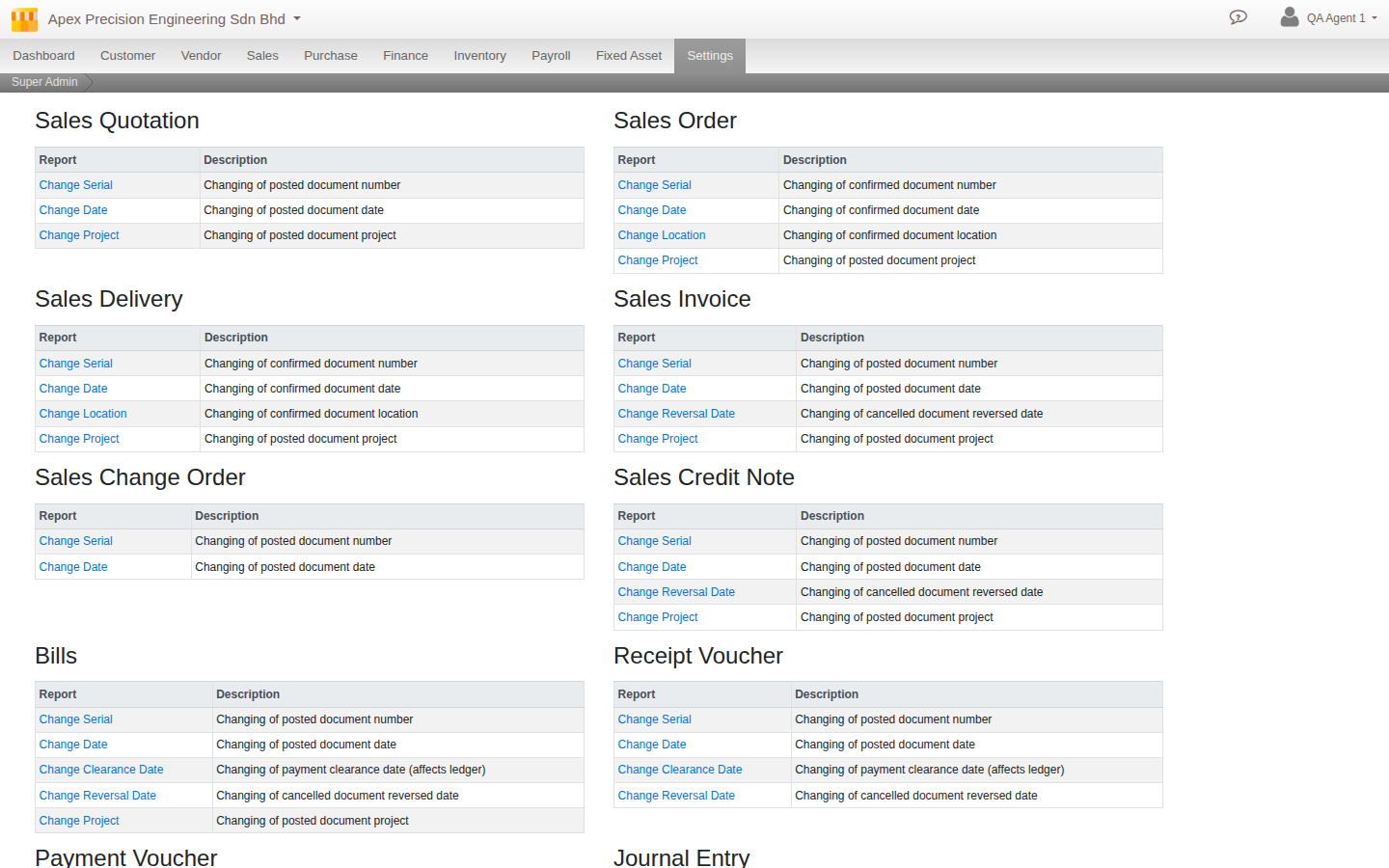
What it can change
Each document type offers its own curated list of corrections, not one blanket set of fields: most offer some combination of Change Serial, Change Date, Change Location, Change Project and Change Reversal Date. A few get a tool built for that document instead: Bills and the payment/receipt vouchers get Change Clearance Date (the one operation that actually touches the ledger), and Fixed Asset gets its own Change Acquiring Document and Reclassify Ledger Pair. It covers sales, purchase, finance, payroll and fixed asset documents; production is not covered.