This is the step-by-step. For what it is and how it fits the bigger picture, read Service in the reference.
Setup task
What this does
An Entitlement is a customer's service contract — a maintenance plan, a support agreement, an SLA — that covers work at a flat fee or draws it down from a quota, instead of billing every order line separately.
Open Entitlements
Go to Menu > Service > Entitlements, then New Entitlements.
Set it up
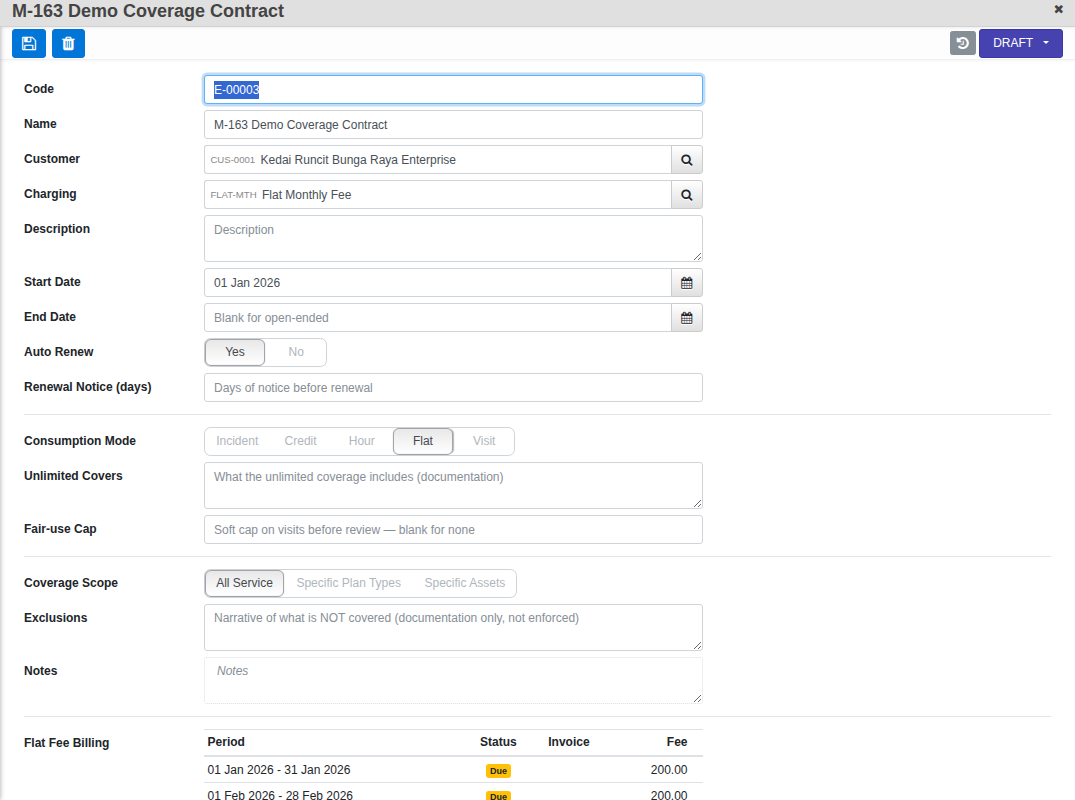
- Set the Customer and a Charging profile — this prices any covered work and, for a Flat contract, carries the flat fee itself.
- Set Start Date (required) and, if the contract has an end, End Date. Turn on Auto Renew if it should keep going, with a Renewal Notice in days.
- Pick a Consumption Mode: Flat (unlimited for the fixed fee), or Incident / Visit / Hour / Credit (a quota that counts down as work orders are accepted). Flat shows an Unlimited Covers note and an optional Fair-use Cap; the quota modes show a Quota size, Quota Period and whether it can Rollover.
- Set Coverage Scope: All Service, or narrow it to Specific Plan Types or Specific Assets — save the entitlement first, then add the covered types or assets on its own list below.
Move it along
A new entitlement starts Draft. Activate it once Start Date is set; from Active you can Suspend, Expire or Cancel it, and a Suspended contract can Resume. Once active, the terms that anchor the contract — Start Date, End Date, Consumption Mode, Quota Period and Coverage Scope — lock, so a live contract cannot quietly change shape underneath its own billing history.
What it does once live
A Flat entitlement keeps its own Flat Fee Billing schedule right on the record — one row per period, Raise Fee generates the invoice. A quota-based entitlement instead keeps a running Balance & Journal: every covered work order posts an entry, and you can post a manual Adjust with a reason if a correction is needed.
Cover an order with it
On a service order, set Entitlement and switch Use Entitlement to Yes. Once accepted, covered work bills at zero on the order's own Billings tab — the entitlement's own fee is the revenue, not the order.