This is the step-by-step. For what it is and how it fits the bigger picture, read Tenants in the reference.
What this is
Cloudby is a subscription service. This explains what you pay for, and why two organisations can have different things switched on. The key idea: billing is per organisation, not per person.
You subscribe per organisation
Your personal account is yours to keep and costs nothing to own. What carries a subscription is each organisation. Every organisation has its own plan, its own features, and its own bill, even though you reach them all with one login.
Features are switched on per organisation
The modules and capabilities an organisation has, such as Sales, Payroll or e-Invoice, are part of its subscription. That is why your menu can differ from one organisation to the next: each has its own set of features enabled. Adding a capability is a matter of enabling that feature on the organisation.
Quota meters usage
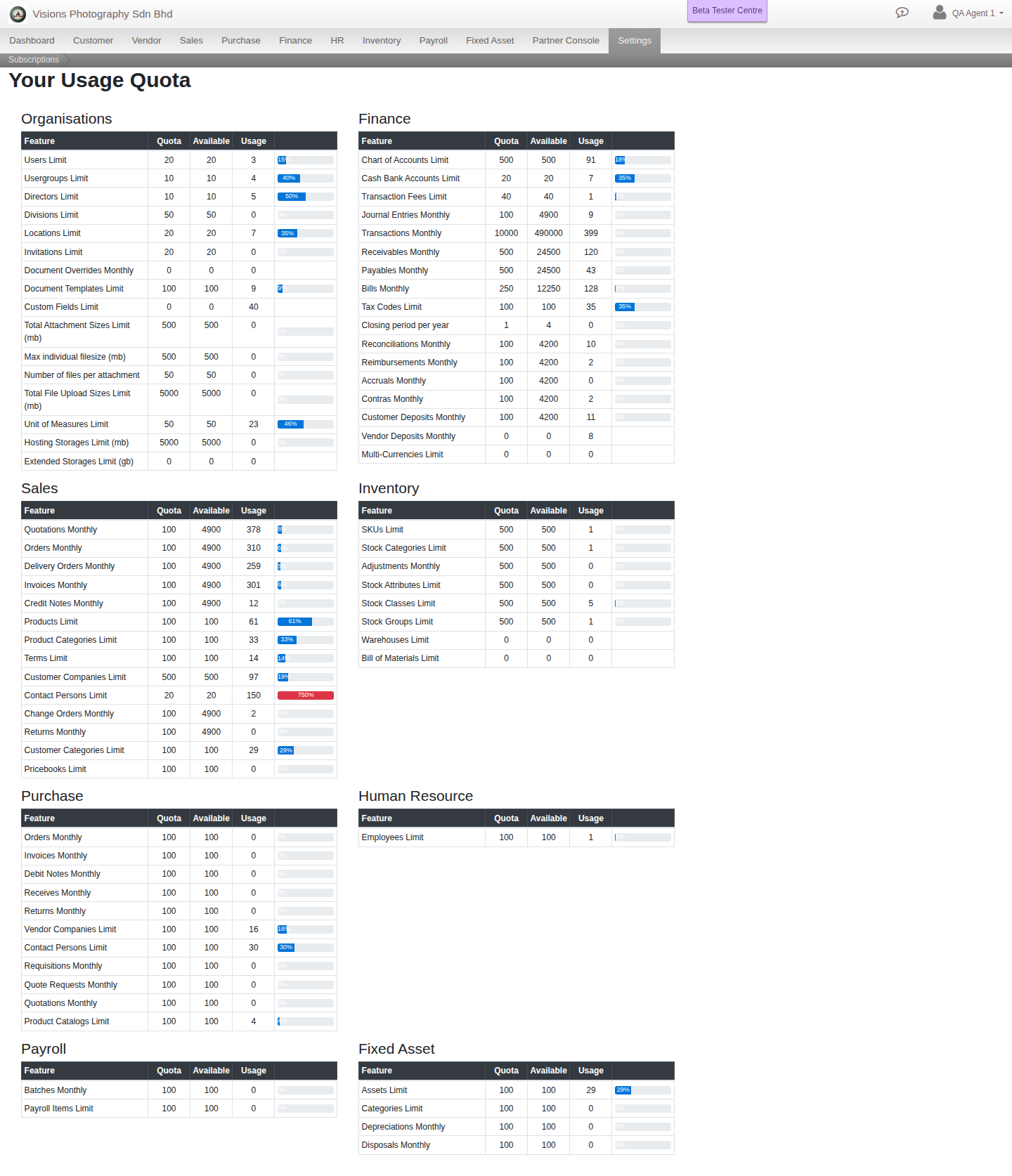
Some things are measured against a quota for the organisation: how many users it has, how many Chart of Accounts entries, SKUs or employees, and how many transactions of each kind (invoices, bills, journal entries and more) it can post in a month. The Usage Quota screen groups every one of these by module and shows current usage against each limit, so you can see how much headroom is left before you need to raise the plan.
Where to look
For an organisation with billing in your hands, go to Menu > Settings > Billing for its Subscription, Payments and Usage Quota. New organisations usually begin on a trial before a plan is chosen.