
Scope: the whole migration process in order, plan through to stabilisation, linking to a companion guide at each step for the mechanics.
What this guide is not: a field-by-field how-to for any single step, each companion guide covers its own ground in depth.
1. Plan
Before touching any settings, settle the basics as a project: what is actually in scope for this migration, a rough timeline, who the stakeholders are, and a cutover date, the point at which Cloudby becomes the real system of record and the old one stops being updated. Everything from here on refers back to that date.
2. Design your roles
Decide the usergroups your organisation needs before you configure anything else or invite anyone. This is not this guide’s territory, Compartmentalizing access covers designing groups around job functions and least privilege in full, do that work first.
Further reading. Guide: Compartmentalizing access.
3. Configure your organisation
Organisation settings, locations, units and numbering, custom fields, and the power admin tools, Document Overrider, Configurator, and Data Porting, are all covered in full in the sysadmin guide. Set these up before importing data, not after.
Further reading. Guide: Configuring and administering your Cloudby organisation.
4. Import your data, in the right order
Chart of Accounts, units, locations, and currency first, then the master data that depends on them, customers, vendors, stock, employees, then transactional documents. Getting the order right the first time avoids a frustrating cycle of failed imports, and the data import order guide sets it out in full, wave by wave, along with the real mechanics of the import screen itself and how to verify a batch before moving to the next.
Further reading. Guide: Data import order.
5. Bringing in existing fixed assets
Fixed assets do not go through Data Porting at all, they come in through the Acquire flow the Fixed Assets guide covers in full. Worth naming plainly here: today there is no way to record a pre-owned asset’s original cost and acquisition date separately from the book value it carries at the point you migrate it in, a known, currently open gap. If your asset register matters for depreciation history or audit purposes, plan for this before you commit to a migration date, rather than discovering it partway through.
Further reading. Guide: Managing fixed assets in Cloudby.
6. Verify before you trust it
Once master data and opening balances are in, do not simply assume they are correct. The finance data guide covers the full verification toolkit, Transaction Preview, General Ledger and Subledger, and Trial Balance, along with the correct technique for opening balances themselves, which is easy to get wrong in a way that looks fine on screen and is not.
Further reading. Guide: Getting your finance data right.
7. Bring your team onboard
Wait until data is verified before opening the door to your wider team, not before. Bringing in fifty or two hundred people while the Chart of Accounts is still being checked only adds confusion. The team onboarding guide covers the real technique, one signup link per department, built and locked before you distribute it, and what delegating this to department managers does and does not support.
Further reading. Guide: Bringing your team onboard.
8. Train the team
Once people are in the system, train them on it, in the roles they will actually use day to day. This is deliberately not prescribed here, it depends entirely on your business and your team, but it belongs after onboarding and before you rely on anyone using the system for real work.
9. Parallel run
Parallel run is a standard migration practice, not a Cloudby feature, worth explaining plainly since not everyone running a migration has done one before. For a defined window, commonly a month, you keep your old system as the system of record while also entering the same real activity into Cloudby, then compare the two at the end, revenue, AR and AP balances, stock, tax, whatever matters for your business. If the numbers agree, or every difference is explained, that is real evidence the new system is configured correctly and your team knows how to use it, with the old system still there as a safety net the whole time.
It is a real cost, double data entry for a month is real staff time, which is exactly why many smaller businesses run a lighter version instead, one department only, a shorter window, or comparing only the month-end totals, Trial Balance, AR and AP aging, stock valuation, rather than every single transaction. There is no built-in tooling for this comparison, it is a manual step using the reports covered in the finance data guide, pull the same figures from both systems and compare them side by side.
10. UAT
A real acceptance checklist, run by real users, before you commit to cutover. Like parallel run, this is a practice you run, not a mode Cloudby switches into, there is no dedicated staging or testing environment available to a standard organisation, self-sign-up organisations do not get one. If you are onboarding through a Cloudby partner, ask whether a managed staging environment is part of that engagement, that is a real option worth knowing about rather than assuming it does not exist at all.
11. Cutover
Once opening balances are verified, close every accounting period up to and including your cutover date, Menu > Finance > Accounting Processes > Period Management, which opens a screen titled Closing Period. This is not a special migration feature, it is the same period lock every business uses monthly, and it works as a real cutover boundary, once a period is closed, nothing can be backdated into it. This only protects the Cloudby side, nothing can stop activity continuing in an old system after your agreed date, that half is discipline, not software.
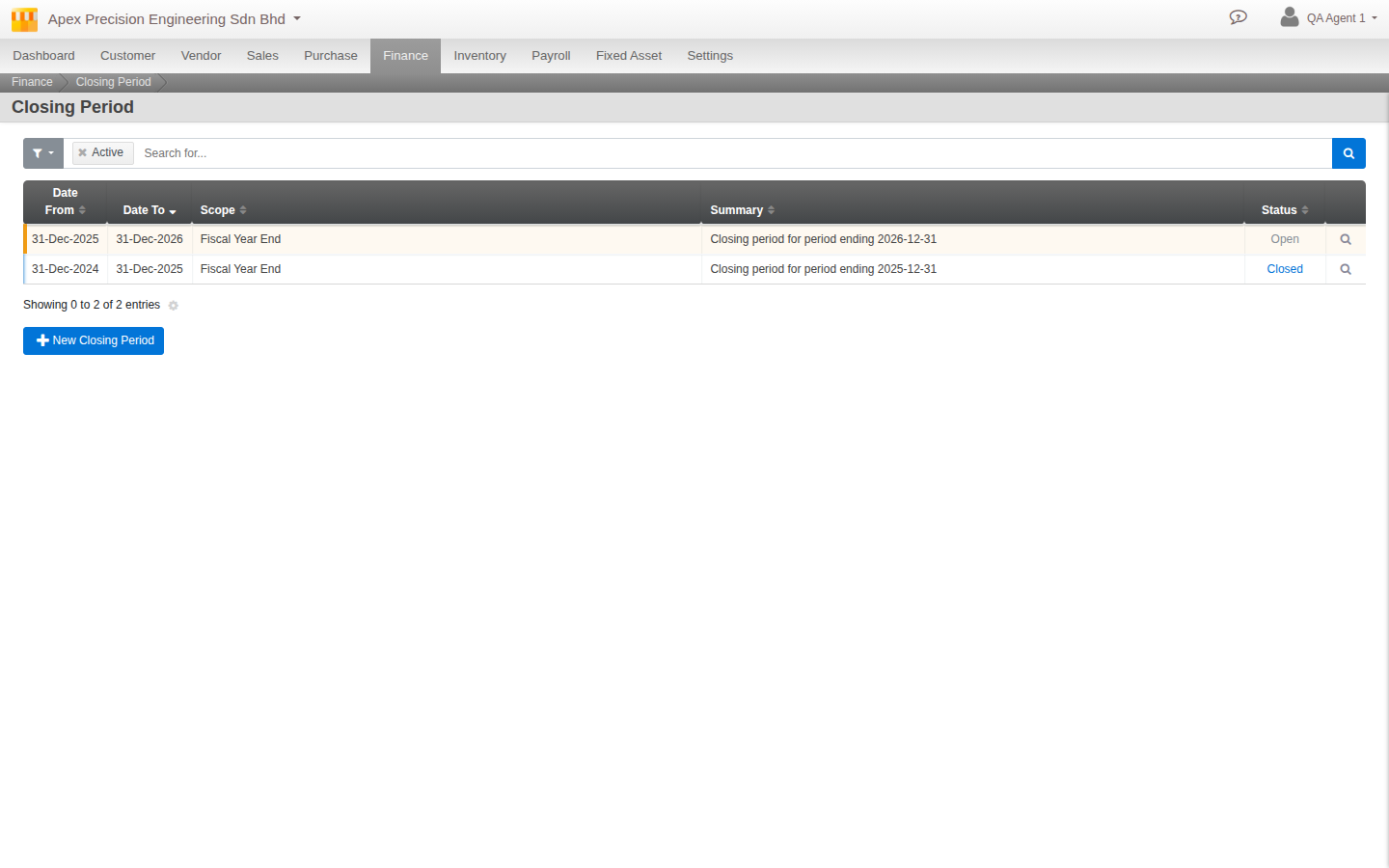 Closing Period: one row open, one closed, the real cutover-lock mechanism
12. Go live, then stabilise
In the first weeks, watch the same things you verified before cutover, does the opening-balance suspense ledger stay explained, do reports tie out. If your stock count was not fully exact on day one, the inventory guide covers a real technique for correcting it progressively over the following weeks rather than all at once.
Further reading. Guide: Inventory data migration.
What’s next
A few notes as you plan your migration:
- There is no self-service backup or restore point available to an organisation admin today, and no undo once a data import is committed. The practical safeguard throughout this whole process is small, independently verified steps, not a safety net to fall back on afterward, see the data import order guide for the full reasoning.
- Payroll and multi-currency are both deliberately out of scope here, each has its own considerations that deserve their own guide rather than a rushed mention.
Scenarios and troubleshooting
We do not have the time or staff for a full month-long parallel run.
That is common, see section 9, a shorter window or comparing only month-end totals instead of every transaction is a real, legitimate lighter version, not a corner cut.
We need a safe environment to test in before real staff touch the live organisation.
See section 10, a standard self-sign-up organisation does not get one. Ask a managing partner about a staging environment if you are onboarding through one.
Our existing fixed asset register has assets bought years ago, with real depreciation history we need to preserve.
Read section 5 carefully before committing to a date, this is a real, currently open limitation, not something a workaround in this guide can fully solve.
Someone posted a real transaction in our old system after the agreed cutover date.
Section 11 explains why Cloudby cannot prevent this on the old system’s side, only enforce the boundary on its own. This has to be caught and handled as a process issue with whoever still had access to the old system.
Related
- Guide: Compartmentalizing access
- Guide: Configuring and administering your Cloudby organisation
- Guide: Data import order
- Guide: Getting your finance data right
- Guide: Bringing your team onboard
- Guide: Inventory data migration
- Guide: Managing fixed assets in Cloudby