Learn the concept
This is the step-by-step. For what it is and how it fits the bigger picture, read Credit Note in the reference.
This is the step-by-step. For what it is and how it fits the bigger picture, read Credit Note in the reference.
What this does
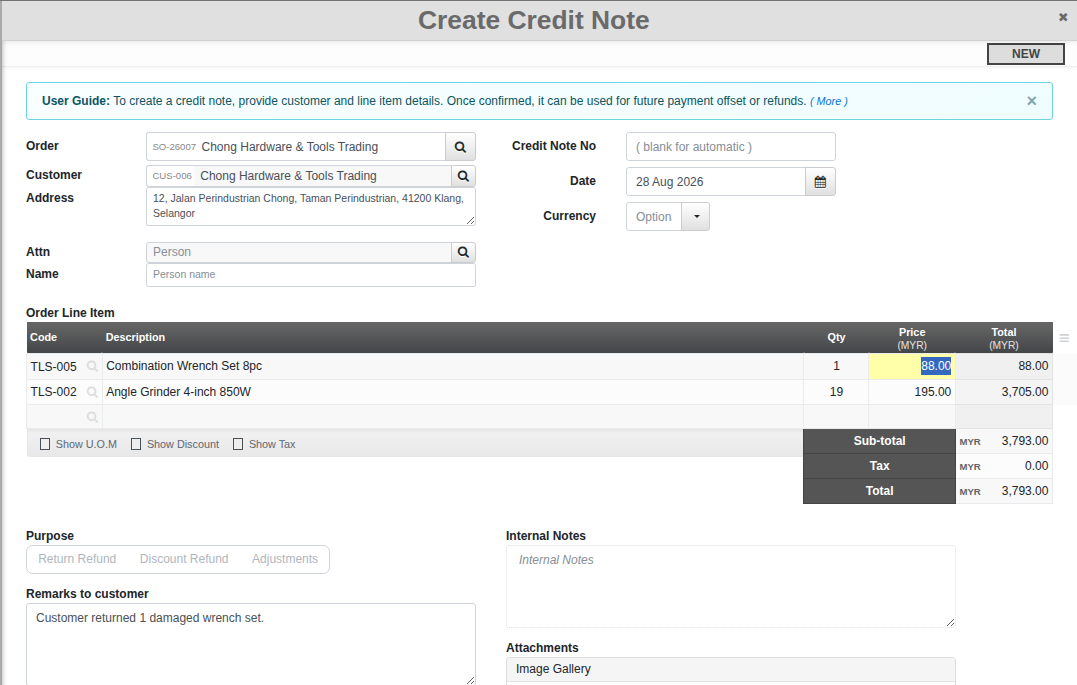
A credit note reverses or reduces a sales invoice, for a return, a discount or a correction.
Before you start
The invoice you are crediting.
Open Credit Note
Go to Menu > Sales > Credit Note, or use a credit note from the order Billing tab.
Steps
- Click Create and pick the customer and the invoice or lines to credit.
- Set the Purpose (Return Refund, Discount Refund, or Adjustments), enter the amounts or quantities to credit, and add a reason.
- Confirm. The credit note lowers what the customer owes and posts the reversal to Finance.