Learn the concept
This is the step-by-step. For what it is and how it fits the bigger picture, read Sales Order in the reference.
This is the step-by-step. For what it is and how it fits the bigger picture, read Sales Order in the reference.
What this does
The Allocate tab reserves stock for a sales order so it is set aside for that customer, and lets you raise a purchase or a manufacture order for anything short.
Before you start
A confirmed sales order with stock items.
Open the Allocate tab
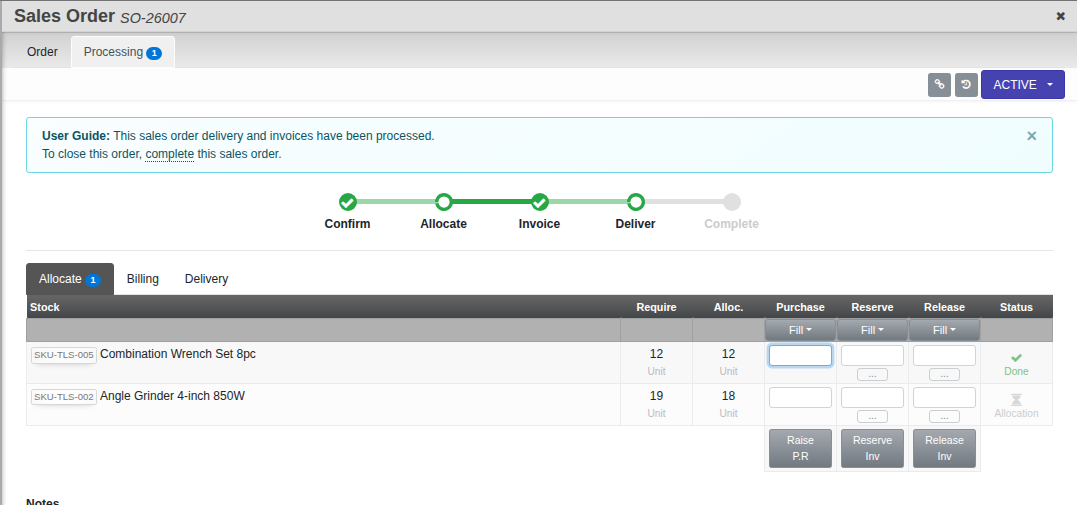
Open the sales order, go to the Processing tab, then Allocate.
Steps
- Each line shows Stock, Require, Allocated and Status.
- Use Reserve Inv to set stock aside for the order, or Release Inv to free it again.
- For anything you do not have, use Raise P.R to raise a purchase requisition, or Raise M.O to raise a manufacture order.
Field guide
- Require / Allocated. How much the order needs and how much is reserved.
- Status. Done once fully allocated, Allocation while still short, or Excess / Over Delv if you have allocated or delivered more than the line needs.
- Reserve Inv / Release Inv. Set aside or free stock.
- Raise P.R / Raise M.O. Buy or make what is short.