Learn the concept
This is the step-by-step. For what it is and how it fits the bigger picture, read Depreciation in the reference.
This is the step-by-step. For what it is and how it fits the bigger picture, read Depreciation in the reference.
What this does
Depreciation spreads an asset cost across its useful life. A depreciation run works out the charge for every eligible asset in one go and posts it to the accounts.
Open Depreciation
Go to Menu > Fixed Asset > Depreciation and click Create.
Steps
- Set the Schedule date. Narrow which assets are considered with Filter by category or Filter by ledger if you want, and set Scope Include to Eligible Only (assets actually due for a charge) or All Assets.
- Click Create. Cloudby works out the charge for every asset in scope immediately, there is no separate generate step, and lists them as a Draft.
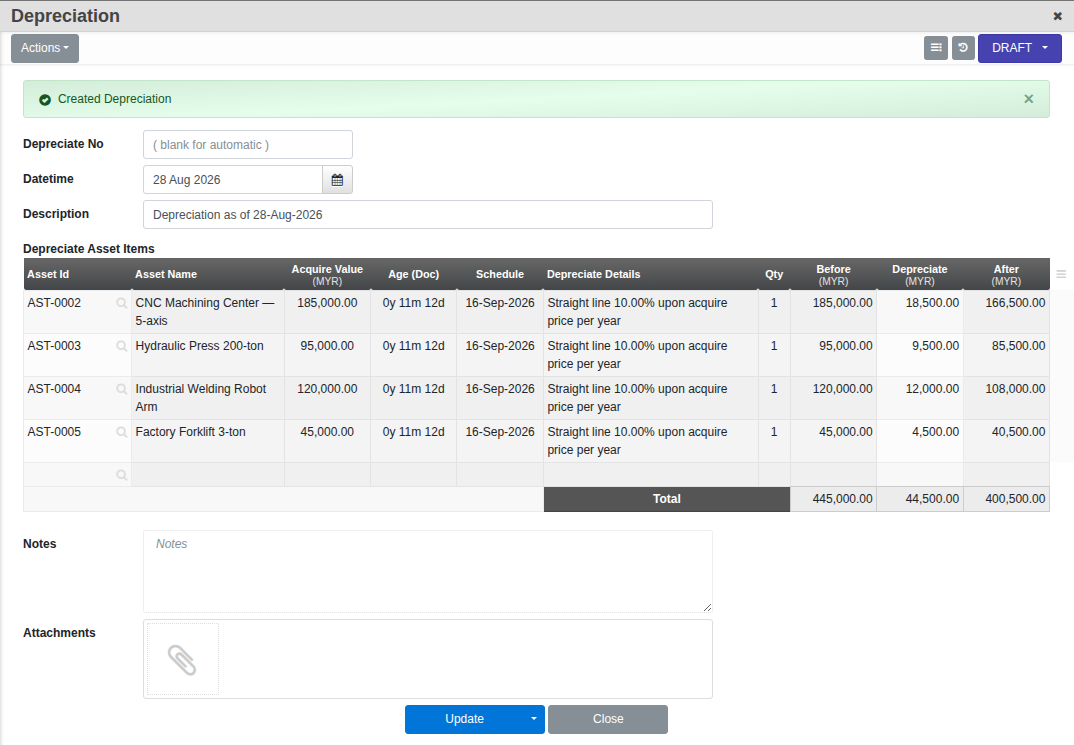
- Review the Depreciate Asset Items table and the Description, then Confirm to post. The depreciation expense and accumulated depreciation post to the ledgers set on each asset.
Good to know. Depreciation currently only runs on a yearly frequency, not because this screen limits it, but because every asset’s own Frequency field is locked to once a year. Each asset keeps a running value history so you can see its book value over time.