Learn the concept
This is the step-by-step. For what it is and how it fits the bigger picture, read Payroll Items in the reference.
This is the step-by-step. For what it is and how it fits the bigger picture, read Payroll Items in the reference.
Setup task
What this does
Payroll items are the building blocks of pay: each earning, deduction and contribution you use. Set them up once and assign them to people.
Open Payroll Items
Go to Menu > Payroll > Settings > Payroll Items. The Payroll Setup wizard helps you switch on the standard items for the first time.
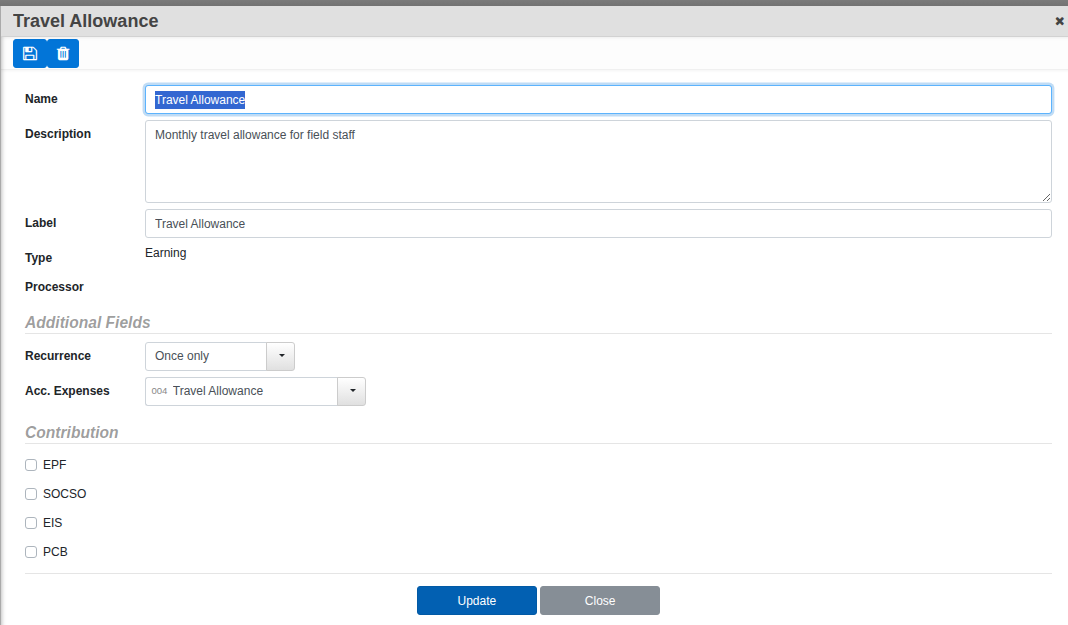
What defines an item
- Name and Label. What it is, and how it reads on a payslip.
- Type. Earning or Deduction.
- Recurring. Whether it repeats every month or is added per run.
- Contributable. Whether it feeds the statutory calculations (EPF, SOCSO, EIS, PCB).
Good to know. The statutory items (EPF, SOCSO, EIS, PCB) come ready with the Malaysian rules built in. You mostly add your own earnings and deductions, such as allowances or advances.