Learn the concept
This is the step-by-step. For what it is and how it fits the bigger picture, read Requisition in the reference.
This is the step-by-step. For what it is and how it fits the bigger picture, read Requisition in the reference.
What this does
A requisition is an internal request to buy something. It starts the buying process and goes for approval before any money is committed.
Before you start
Access to Purchase, and you know what is needed.
Open Requisition
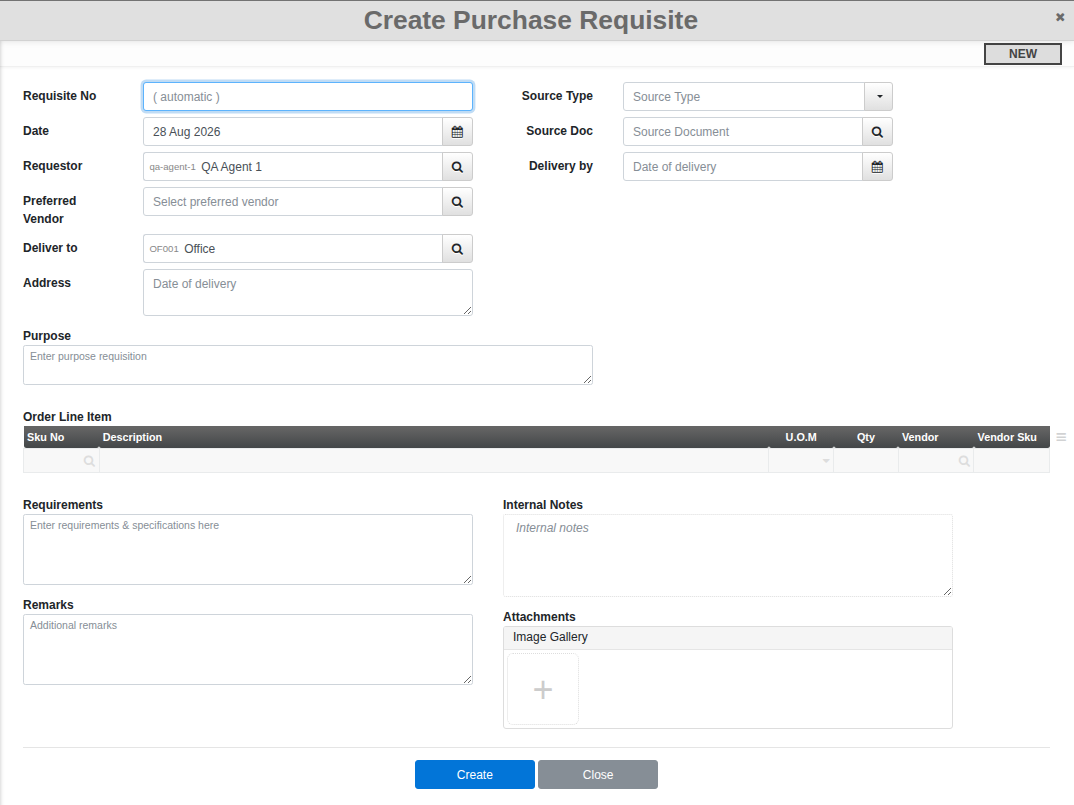
Go to Menu > Purchase > Requisition and click Create.
Steps
- Requestor and Deliver to default to you and your own location; change either if this requisition is for someone or somewhere else. Set a Preferred Vendor if you already have one in mind.
- Add each item you need in the Order Line Item table (Sku, description, unit and quantity, plus a vendor per line if you know who to buy it from), and use Requirements for any spec or note a line item cannot capture. Purpose explains why the request exists.
- Depending on whether your organisation requires approval, you will see either Confirm or Submit for Review. Where review is required, a reviewer then Accepts or Rejects it, and a rejection carries a reason you can see on the document.
Good to know. Requisitions can also be raised automatically from a sales order or a manufacture order, not just typed from scratch here.