Learn the concept
This is the step-by-step. For what it is and how it fits the bigger picture, read Purchase Invoice in the reference.
This is the step-by-step. For what it is and how it fits the bigger picture, read Purchase Invoice in the reference.
What this does
A purchase invoice records the vendor bill against the purchase order, so what you pay matches what was ordered.
Before you start
The purchase order, plus the vendor bill.
Open Invoice
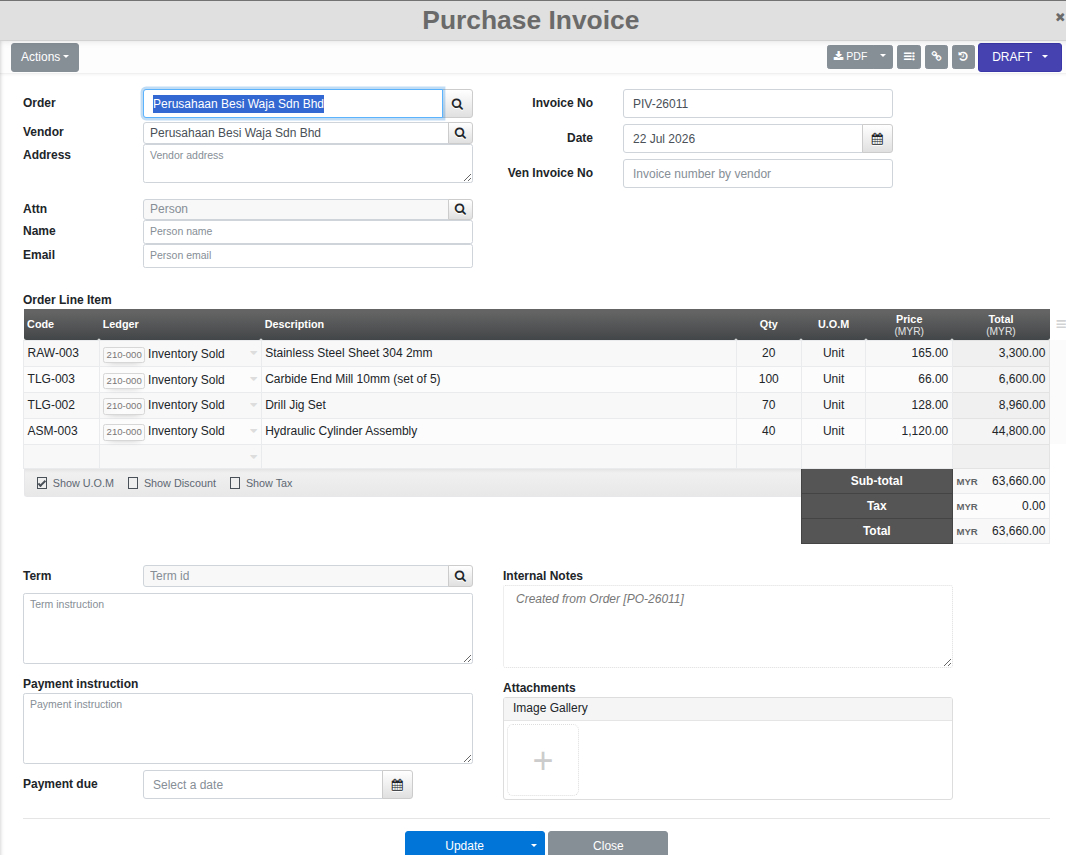
The easiest way in is straight from the order: open the Purchase Order and click Ven.Invoice, which carries the vendor and line items across automatically. You can also go to Menu > Purchase > Invoice and click Create, then link the Order yourself.
Steps
- Enter the Ven Invoice No (the number on the vendor’s own bill).
- Check the Order Line Item rows carried over from the order, including the Ledger each line posts to.
- Set the Term and Payment due date, then Confirm to post it. The Payment Status tracks Pending, Partial or Complete as it gets paid.
- For an adjustment after posting, use Raise debit note from the invoice’s own Actions menu. The original invoice stays unchanged.
Good to know. Raising the invoice from the order (rather than typing one from scratch) is the fastest way to keep the vendor, line items and pricing in step with what was actually ordered.