This is the step-by-step. For what it is and how it fits the bigger picture, read Project in the reference.
What this does
Setting up a project gives you a cost code to tag work against, and a single view of how that work is performing financially.
Open Projects
Go to Menu > Project > Projects and click Create.
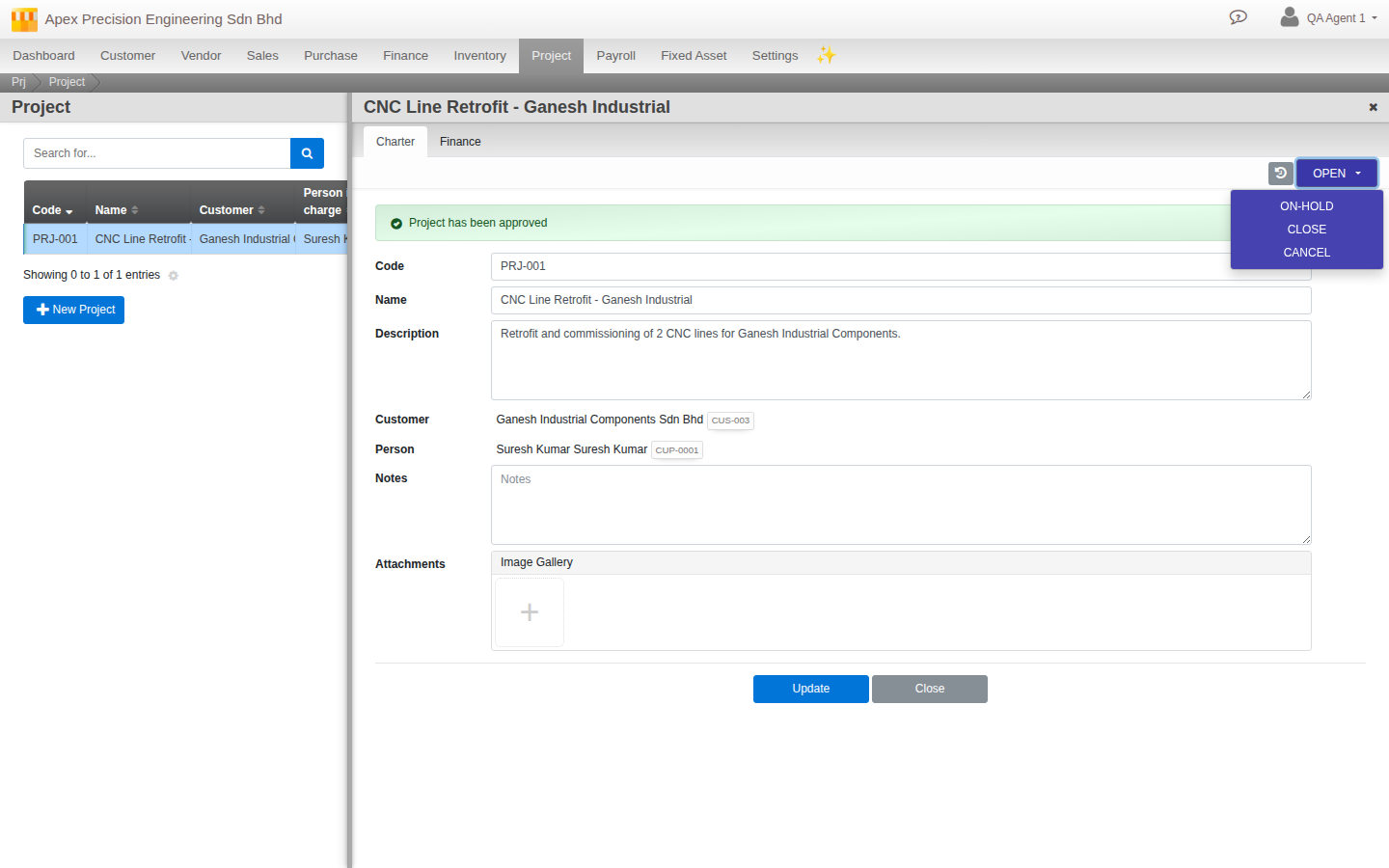
Set up the charter
On the Charter tab, give the project a Name and Description, and link the Customer and the Person in charge. Submit for Review, then Accept it (or Reject to send it back) to move it to Open. From there, put it On-Hold (and Resume later), Close it once the work is done, or Cancel it outright; a closed or cancelled project can always be Re-opened.
Tag documents to it
Set the Project field when you raise almost any sales or purchase document: quotations, orders, deliveries, invoices and credit notes on the sales side; requisitions, quote requests, quotations, orders, receives, invoices and debit notes on the purchase side; plus bills and reimbursement claims. That links the document to this project.
See how it is doing
The Finance tab lists every linked document, grouped by document type, each with its date, amount and status. Posted amounts total into Income and Expenses panels above the list, so you can compare what the project earned against what it cost.