Learn the concept
This is the step-by-step. For what it is and how it fits the bigger picture, read Purchase Order in the reference.
This is the step-by-step. For what it is and how it fits the bigger picture, read Purchase Order in the reference.
What this does
A purchase order commits you to buy from a vendor. It is the document the vendor fulfils, and what goods receiving and the bill are matched against.
Before you start
The vendor is set up, and ideally you have a quote to work from.
Open Purchase Order
Go to Menu > Purchase > Purchase Order.
Steps
- Click Create. Pick the Vendor and check the address and contact.
- Add the Order Line Item rows. The vendor catalogue pre-fills the SKU, price, tax and UOM for items you buy from them.
- Set the Term (payment terms), Currency and a Delivery by date, and reference the Ven. Quote No if there is one.
- Use Confirm (or Submit for Review). The order becomes Active.
What happens next
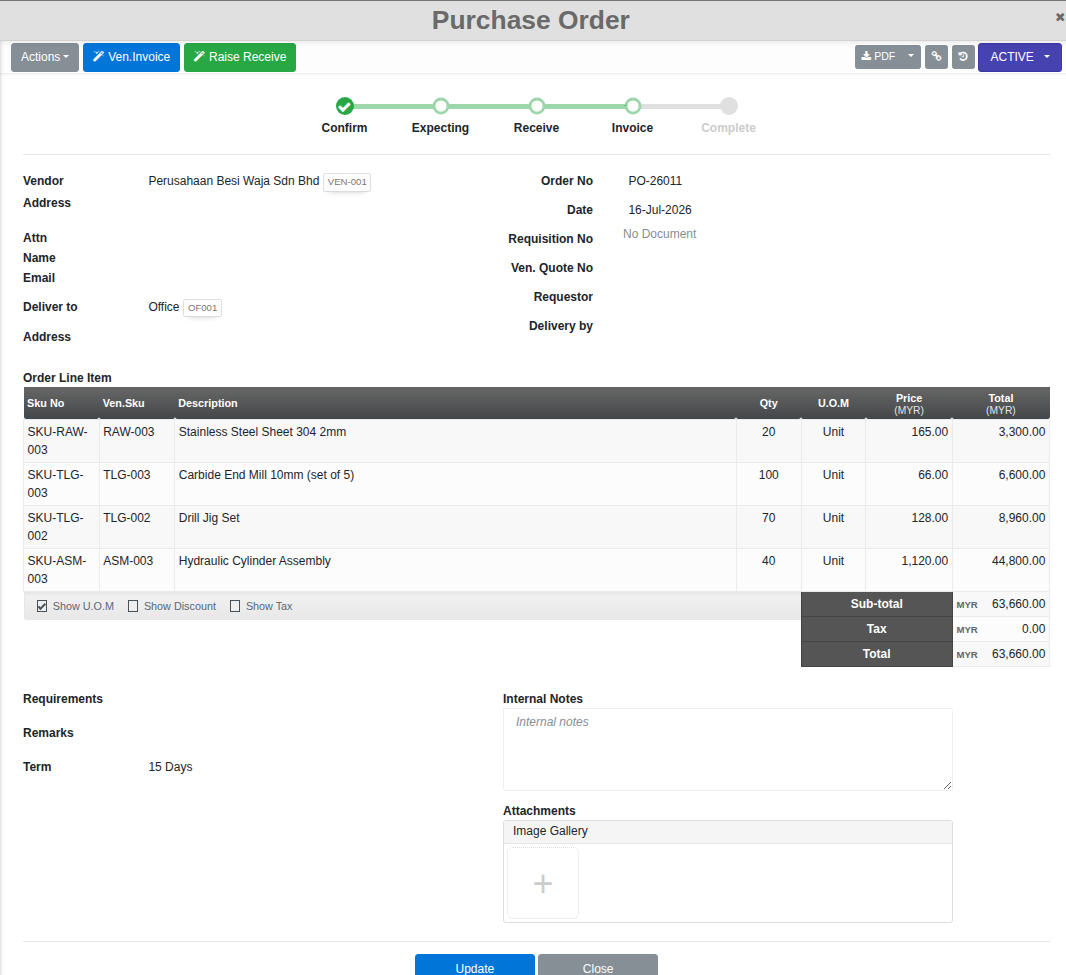
Once confirmed, the order’s own stepper tracks it through Confirm, Expecting, Receive, Invoice and Complete, and two buttons take you straight into the next steps: Raise Receive to check the goods in, and Ven.Invoice to record the vendor’s bill against this order. You can also put an order On-Hold or Cancel it.
Good to know. Raising the goods receipt or invoice straight from the order’s own buttons carries the vendor, line items and pricing across automatically, so you are not re-entering the same order twice.